Resistive Touch Screen (RTP) vs. Capacitive Touch Screen (CTP)
2025/10/31
|
Aspect |
Resistive Touch Screen |
Capacitive Touch Screen |
|
Operating Principle |
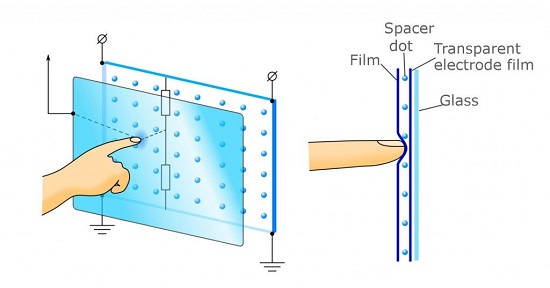
Consists of two transparent conductive layers separated by tiny insulating dots. When pressure is applied, the layers make contact, forming a resistive bridge. The controller measures voltage dividers in the X and Y directions to determine the touch coordinates. |
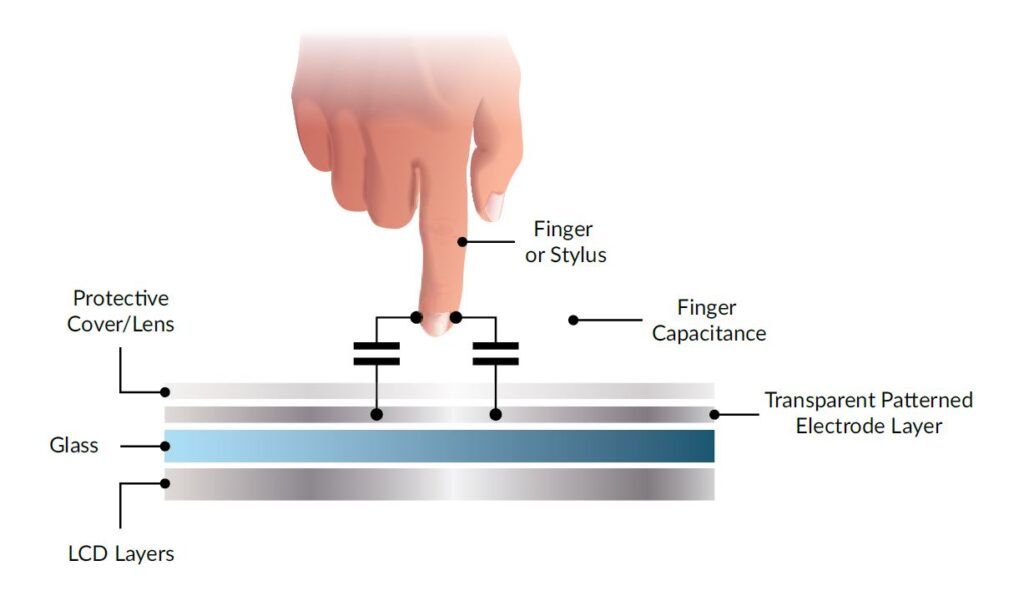
Uses capacitive sensing: a finger (or other conductive object) creates a small coupling capacitance with the screen’s conductive layer. The controller detects changes in capacitance and calculates the coordinates. |
|
Structure |
Typically a four, five, or eight wire configuration with two ITO (indium tin oxide) conductive layers on a plastic or glass substrate, separated by transparent spacers. |
Usually a single layer or mutual capacitance grid structure: a four layer composite glass (inner and outer ITO layers) with a protective coating; electrodes are arranged at the corners or in intersecting rows and columns. |
|
Touch Method |
Requires a certain amount of pressure; any object—conductive or non conductive (finger, stylus, gloved hand)—can trigger a touch. |
Requires only a light touch, but the touching object must be conductive (finger, capacitive stylus). Non conductive objects (gloves, fingernails) cannot activate the screen. |
|
Sensitivity & Response Speed |
Higher touch threshold, relatively slower response, generally limited to single point touch. |
High sensitivity and fast response, enabling smooth sliding and gesture operations. |
|
Multi?Touch Capability |
Traditional resistive screens detect only a single point; some advanced models can detect two points but are limited. |
Naturally supports multi touch (mutual capacitance or surface capacitance), allowing simultaneous detection of multiple touch points. |
|
Display Quality |
The two conductive layers and plastic substrate reduce light transmission, resulting in lower brightness and contrast. |
Only a single conductive layer is present, allowing high light transmission and clearer, more vibrant displays. |
|
Durability |
Surface is a soft plastic, prone to scratches but resistant to impact; can operate in harsh environments (dust, rain). |
Uses hardened glass, resistant to scratches and impact, though glass breakage risk is higher. |
|
Cost |
Simple structure and inexpensive materials make it cheaper overall. |
Requires high?precision glass and complex driver ICs, leading to higher cost. |
|
Typical Applications |
Industrial control panels, automotive navigation, POS terminals, scenarios requiring stylus or gloved operation. |
Smartphones, tablets, consumer electronics, devices that need multi point gestures. |
Summary
l Resistive Touch Screens: Operate by pressure induced resistance changes, offering low cost and robustness, usable with any object, but they have lower sensitivity, single point limitation, and modest display quality. They are suited for industrial, automotive, and other environments where durability and cost are priorities.
l Capacitive Touch Screens: Operate by detecting changes in human body capacitance, providing high sensitivity, multi touch support, and superior display quality, though at a higher price. They are prevalent in smartphones, tablets, and other consumer devices that demand smooth, responsive interaction.